In development, coming to the Mac App Store

A player for the music you own

Your music. Nothing in the way.

Open it, add a folder, listen. MNEVMO Music shows your music and lets you control it. That is all it does.

✓ No account ✓ Works offline ✓ Native to Mac

Plays your files where they are. Nothing is uploaded, nothing is copied.

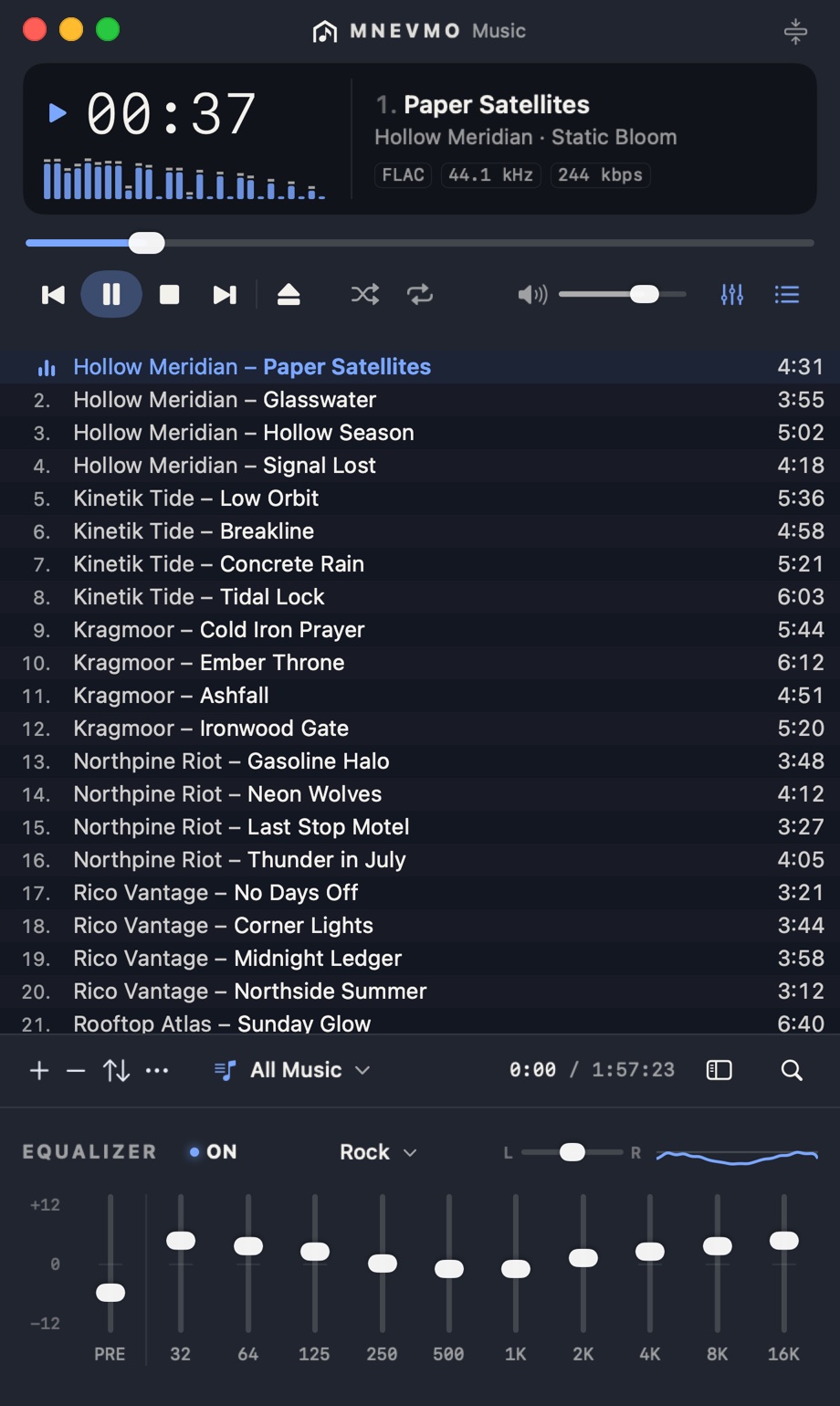
The MNEVMO Music window: the player, the playlist and the equalizer

The problem

Music apps got bigger. The music got smaller.

Most players today are built around a catalogue you rent. Huge artwork, endless pages, recommendations everywhere, and on a full screen you can see maybe eight of your own tracks.

If your music lives in folders you have collected for years, you just want to open them and listen. MNEVMO Music is built for exactly that.

How it works

Turn it on. Listen. Stay in control.

  1. 1

    Turn it on

    Drop a folder into the window. Tracks appear as they are found, and you can press play before a big collection has finished scanning.

  2. 2

    Listen

    Your music in one compact list, dozens of tracks on screen. No artwork walls, no recommendations, nothing between you and the next song.

  3. 3

    Control it

    Space to play and pause, the media keys on your Mac, Command-F to find any track as you type. The app opens tomorrow exactly where you left it.

What's inside

Music and control. Nothing else.

A dense track list

Compact, comfortable, or spacious. In compact mode a normal window shows dozens of tracks and stays easy to read.

Instant search

Title, artist, album, file name. Results update with every letter, and Escape takes you back to the list.

Made for the keyboard

Play, pause, skip, and find without reaching for the mouse. The media keys on your Mac just work.

Gapless, with an equalizer

The next track follows without a break, so live albums and mixes play as one. A ten-band equalizer with presets and your own settings.

Two views

A wider view when you want it.

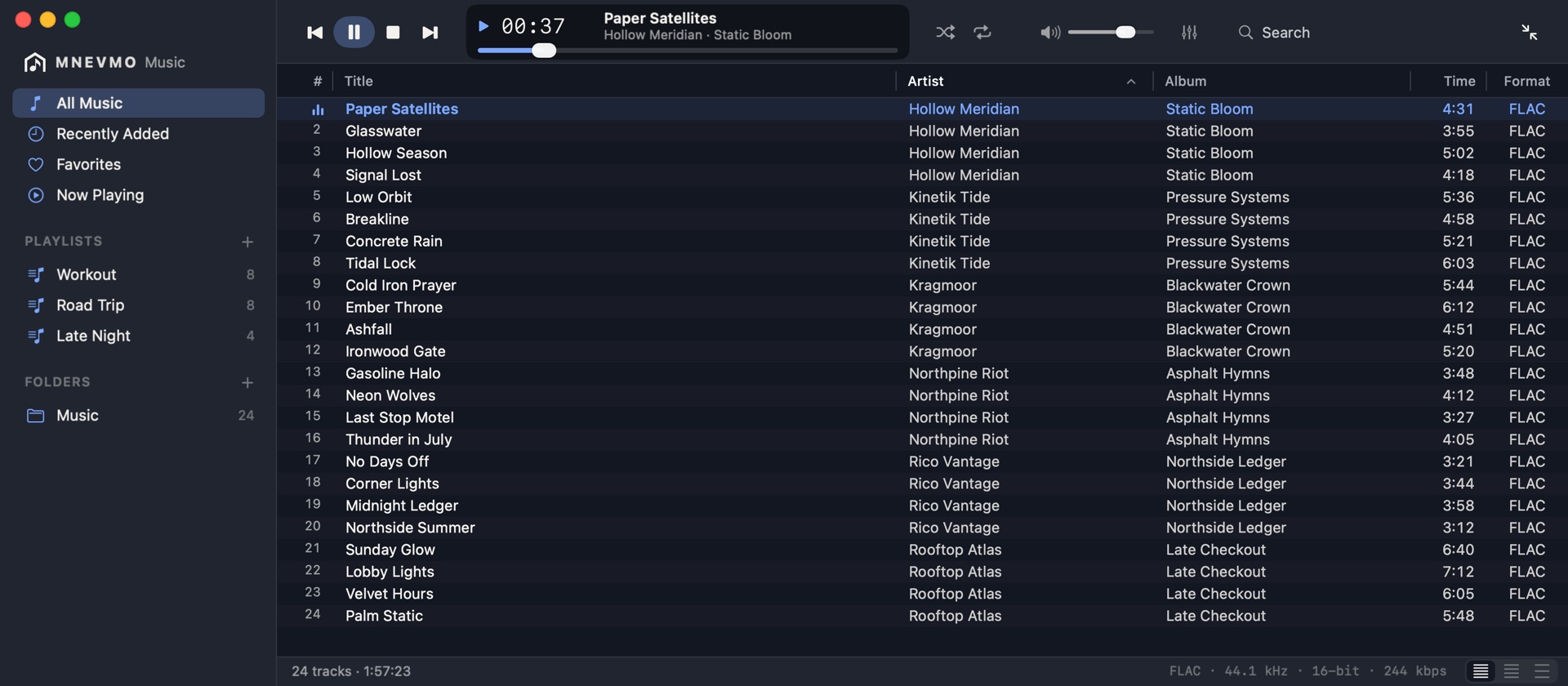
The compact player holds everything in one tall window. Open the Library window for your sources, sortable columns and playlists: the same list in the same themes, one or the other on screen.

The Library window: sources on the left, the list in columns, the player on top

Private by design

Your collection stays yours.

What you listen to is nobody else's business. MNEVMO Music keeps your library and your playlists on your Mac.

Frequently asked questions

Questions, answered.

Is this a streaming service?

No. MNEVMO Music plays the files you already own. There is no catalogue to browse, nothing to subscribe to, and no recommendations competing with your own collection.

Does it copy my music into its own library?

No. It plays straight from your folders and leaves the original files exactly as they are.

Will it cope with a large collection?

That is what it is built for. We test with 100,000 tracks: the list scrolls smoothly and search keeps up as you type. A big folder shows up as it is scanned, and you can start playing before the scan has finished.

Which audio formats will it play?

MP3, AAC and M4A, Apple Lossless (ALAC), FLAC, WAV and AIFF, decoded by macOS itself. WMA is not supported.

Do I need an account or an internet connection?

No. There is no account, and the player works fully offline. Your list of files is never sent anywhere.

Is MNEVMO Music available for Windows?

No. It is a Mac app, built natively for macOS.

When can I download it?

MNEVMO Music is coming to the Mac App Store. Everything is free to try for 10 days; after that, one purchase keeps the music playing, with no subscription. Email support@mnevmo.com if you would like to hear when it is out.
Coming to the Mac App Store

Open your folders. Press play.

A fast, compact player for the music you own.

A question, or want to hear about the release? Email support@mnevmo.com